Search This Blog

Tuesday, December 22, 2020

Chapter 4: Protocols and Models

 Communication Fundamentals

People exchange ideas using many different communication methods. However, all communication methods have the following three elements in common:

  • Message source (sender): Message sources are people or electronic devices that need to send a message to other individuals or devices. 
  • Message destination (receiver): The destination receives the message and interprets it. 
  • Channel: The channel consists of the media that provide the pathway over which the message travels from source to destination. 


Rule Establishment

Protocols are necessary for effective communication and include: 
    • An identified sender and receiver 
    • Common language and grammar 
    • Speed and timing of delivery 
    • Confirmation or acknowledgment requirements


Protocols used in network communications also define: 
    • Message encoding 
    • Message delivery options 
    • Message Formatting and Encapsulation 
    • Message Timing 
    • Message Size

Message Encoding

Encoding between hosts must be in appropriate format for the medium. Messages are first converted into bits by the sending host.
Each bit is encoded into a pattern of sounds, light waves, or electrical impulses depending on the network media. The destination host receives and decodes the signals in order to interpret the message.

Message Formatting and Encapsulation

  • There is an agreed format for letters and addressing letters which is required for proper delivery. 
  • Putting the letter into the addressed envelope is called encapsulation. 
  • Each computer message is encapsulated in a specific format, called a frame, before it is sent over the network. 
  • A frame acts like an envelope providing destination address and source address.


Message Timing

Message timing is very important in network communications. Message timing includes the following:
  • Flow control: This is the process of managing the rate of data transmission. Flow control defines how much information can be sent and the speed at which it can be delivered. For example, if one person speaks too quickly, it may be difficult for the receiver to hear and understand the message. In network communication, source and destination devices use network protocols to negotiate and manage the flow of information. 
  • Response timeout: If a person asks a question and does not hear a response within an acceptable amount of time, the person assumes that no answer is coming and reacts accordingly. The person may repeat the question or may go on with the conversation. Hosts on a network use network protocols that specify how long to wait for responses and what action to take if a response timeout occurs.
  • Access method: The access method determines when someone can send a message. In Figure 3-5, two people are talking at the same time, and a “collision of information” occurs. It is necessary for the two people to back off and start again. Likewise, when a device wants to transmit on a wireless LAN, it is necessary for the WLAN network interface card (NIC) to determine whether the wireless medium is available.

Message Delivery Options

A message can be delivered in different ways. Sometimes, a person wants to communicate information to a single individual. At other times, the person may need to send information to a group of people at the same time, or even to all the people in an area.
Network communication involves similar delivery options, including the following:
  • Unicast: Information is transmitted to a single end device. 
  • Multicast: Information is transmitted to one or more end devices. 
  • Broadcast: Information is transmitted to all end devices. 
PROTOCOLS
Protocol A written specification that defines what tasks a service or device should perform. Each protocol defines messages, often in the form of headers, plus the rules and processes by which the messages are used to achieve some stated purpose

Protocol Interaction
Sending a message over a computer network typically requires the use of several protocols, each one with its own functions and format. 


PROTOCOL SUITES
PROTOCOL SUITES is a set of protocols that work together to provide comprehensive network communication services. A protocol suite can be specified by a standards organization or developed by a vendor.

Evolution of Protocol Suites
A protocol suite is a set of protocols that work together to provide comprehensive network communication services. Since the 1970s there have been several different protocol suites, some developed by standards organizations and others developed by various vendors. 
  • Internet Protocol Suite or TCP/IP: This is the most common and relevant protocol suite used today. The TCP/IP protocol suite is an open standard protocol suite maintained by the Internet Engineering Task Force (IETF). 
  • Open Systems Interconnection (OSI) protocols: This is a family of protocols developed jointly in 1977 by the International Organization for Standardization (ISO) and the International Telecommunications Union (ITU). The OSI protocol also included a seven-layer model called the OSI reference model. The OSI reference model categorizes the functions of its protocols. Today OSI is mainly known for its layered model. The OSI protocols have largely been replaced by TCP/IP.
  • AppleTalk: Apple released this short-lived proprietary protocol suite in 1985 for Apple devices. In 1995, Apple adopted TCP/IP to replace AppleTalk.
  • Novell NetWare: Novell developed this short-lived proprietary protocol suite and network operating system in 1983, using the IPX network protocol. In 1995, Novell adopted TCP/IP to replace IPX. 


Friday, December 18, 2020

Chapter 3 : Physical Layer

 PURPOSE OF THE PHYSICAL LAYER

      All data being transferred over a network must be represented on a medium by the sending node and interpreted on a medium by the receiving node. The physical layer is responsible for these functions. This section explores the physical layer.

Wireless access point (WAP) A network device that provides connectivity of wireless clients to connect to a data network. A wireless AP uses radio waves to communicate with the wireless NICs in the devices and other wireless access points.


Network interface card (NIC) Computer hardware, typically used for LANs, that allows a computer to connect to some networking cable. The NIC can then send and receive data over the cable at the direction of the computer. 


International Organization for Standardization (ISO) An international standards body that defines many networking standards and that created the OSI model. 


Telecommunications Industry Association/ Electronic Industries Association (TIA/EIA) An organization that develops standards that relate to telecommunications technologies. Together, the TIA and the Electronic Industries Alliance (EIA) have formalized standards, such as EIA/TIA-232, for the electrical characteristics of data transmission.


International Telecommunications Union (ITU) A United Nations (UN) agency responsible for issues that concern information and communication technologies. 

American National Standards Institute (ANSI) A private nonprofit organization that oversees development of standards in the United States. 

Institute of Electrical and Electronics Engineers (IEEE) An international, nonprofit organization for the advancement of technology related to electricity. IEEE maintains the standards defining many LAN protocols.


Physical Components
The physical layer standards address three functional areas: 
  • Physical components are the electronic hardware devices, media, and other connectors that transmit the signals representing bits. Hardware components such as NICs, interfaces and connectors, and cables (including cable materials and cable designs) are all specified in standards associated with the physical layer. The various ports and interfaces on a Cisco 1941 router are also examples of physical components with specific connectors and pinouts based on standards.
  • Encoding is a method of converting a stream of data bits into a predefined “code.” Codes are groupings of bits used to provide a predictable pattern that can be recognized by both a sender and a receiver. In other words, encoding is a method or pattern used to represent digital information. This is similar to how Morse code encodes a message using a series of dots and dashes.
  • Signaling The physical layer must generate the electrical, optical, or wireless signals that represent the 1s and 0s on the media. The way that bits are represented is called the signaling method. The physical layer standards must define what type of signal represents a 1 and what type of signal represents a 0. This can be as simple as a change in the level of an electrical signal or optical pulse.

Bandwidth The rated throughput capacity of a given network medium or protocol. Bandwidth is listed as available or consumed data communication resources expressed in bits per second.

A combination of factors determines the practical bandwidth of a network:  
  • The properties of the physical media 
  • The technologies chosen for signaling and detecting network signals 
Bandwidth Terminology
Terms used to measure the quality of bandwidth include: 
  • Latency refers to the amount of time, including delays, for data to travel from one point to another.
  • Throughput is the measure of the transfer of bits across the media over a given period of time.
  • Goodput is the measure of usable data transferred over a given period of time. Goodput is throughput minus traffic overhead for establishing sessions, acknowledgments, encapsulation, and retransmitted bits. Goodput is always lower than throughput, which is generally lower than the bandwidth.
Characteristics of Copper Cabling 

Copper cabling is the most common type of cabling used in networks today. In fact, copper cabling is not just one type of cable. There are three different types of copper cabling that are each used in specific situations.

Networks use copper cabling because it is inexpensive and easy to install, and it has low resistance to electrical current. However, copper cabling is limited by distance and signal interference. 

Data is transmitted on copper cables as electrical pulses. A detector in the network interface of a destination device must receive a signal that can be successfully decoded to match the signal sent. However, the farther the signal travels, the more it deteriorates. This is referred to as signal attenuation. For this reason, all copper media must follow strict distance limitations, as specified by the guiding standards. 

The timing and voltage values of electrical pulses are also susceptible to interference from two sources:

- Electromagnetic interference (EMI) or radio frequency interference (RFI): EMI and RFI signals can distort and corrupt the data signals being carried by copper media. Potential sources of EMI and RFI include radio waves and electromagnetic devices, such as fluorescent lights or electric motors.

- Crosstalk: Crosstalk is a disturbance caused by the electric or magnetic fields of a signal on one wire to the signal in an adjacent wire. In telephone circuits, crosstalk can result in hearing part of another voice conversation from an adjacent circuit. Specifically, when an electrical current flows through a wire, it creates a small, circular magnetic field around the wire, which can be picked up by an adjacent wire. 


Unshielded Twisted-Pair (UTP)
Unshielded twisted-pair (UTP) cabling is the most common networking medium. UTP cabling, terminated with RJ-45 connectors, is used for interconnecting network hosts with intermediary networking devices, such as switches and routers.

Shielded Twisted-Pair (STP)
Shielded twisted-pair (STP) provides better noise protection than UTP cabling. However, compared to UTP cable, STP cable is significantly more expensive and difficult to install. Like UTP cable, STP uses RJ-45 connectors.

Coaxial Cable
Coaxial cable, or coax for short, gets its name from the fact that there are two conductors that share the same axis.
coaxial cable consists of the following: 
1. The entire cable is covered with a cable jacket to prevent minor physical damage. 
2. The insulating material is surrounded by a woven copper braid, or metallic foil, that acts as the second wire in the circuit and as a shield for the inner conductor. This second layer, or shield, also reduces the amount of outside electromagnetic interference. 
3. A layer of flexible plastic insulation surrounds a copper conductor. 
4. A copper conductor is used to transmit the electronic signal.


The numbers in identify some key features of coaxial cable: 
    1. Outer jacket 
    2. Braided copper shielding 
    3. Plastic insulation 
    4. Copper conductor 

Although UTP cable has essentially replaced coaxial cable in modern Ethernet installations, the coaxial cable design is used in the following situations: 
  • Wireless installations: Coaxial cables attach antennas to wireless devices. The coaxial cable carries radio frequency (RF) energy between the antennas and the radio equipment. 
  • Cable internet installations: Cable service providers provide internet connectivity to their customers by replacing portions of the coaxial cable and supporting amplification elements with fiberoptic cable. However, the wiring inside the customer’s premises is still coax cable. 
fiber-optic cable A physical medium that uses glass or plastic threads to transmit data. A fiber-optic cable consists of a bundle of these threads, each of which is capable of transmitting data into light waves.

Fiber-optic cabling is now being used in four types of industry: 
  • Enterprise networks: Fiber is used for backbone cabling applications and for interconnecting infrastructure devices. 
  • Fiber-to-the-home (FTTH): Fiber is used to provide always-on broadband services to homes and small businesses. 
  • Long-haul networks: Service providers use fiber to connect countries and cities. 
  • Submarine cable networks: Fiber is used to provide reliable high-speed, high-capacity solutions capable of surviving in harsh undersea environments at up to transoceanic distances. Search the internet for “submarine cables telegeography map” to view various maps online.
WIRELESS MEDIA

Wireless media carry electromagnetic signals that represent the binary digits of data communications using radio wave or microwave frequencies.


Wireless media provide the greatest mobility options of all media. Wireless is now the primary way users connect to home and enterprise networks, and the number of wireless-enabled devices continues to increase. 

These are some of the limitations of wireless: 
  • Coverage area: Wireless data communication technologies work well in open environments. However, certain construction materials used in buildings and structures, as well as the local terrain, can limit the effective coverage. 
  • Interference: Wireless is susceptible to interference and can be disrupted by such common devices as household cordless phones, some types of fluorescent lights, microwave ovens, and other wireless communications. 
  • Security: Wireless communication coverage requires no access to a physical strand of cable. Therefore, devices and users not authorized for access to the network can gain access to the transmission. Network security is a major component of wireless network administration. 
  • Shared medium: WLANs operate in half-duplex, which means only one device can send or receive at a time. The wireless medium is shared among all wireless users. Many users accessing the WLAN simultaneously results in reduced bandwidth for each user.
Although wireless is increasing in popularity for desktop connectivity, copper and fiber are the most popular physical layer media for deployment of intermediary network devices, such as routers and switches.

Types of Wireless Media

The IEEE and telecommunications industry standards for wireless data communications cover both the data link and physical layers. In each of these standards, physical layer specifications are applied to areas such as the following:
  • Data-to-radio signal encoding 
  • Frequency and power of transmission 
  • Signal reception and decoding requirements 
  • Antenna design and construction
These are the wireless standards:
  • Wi-Fi (IEEE 802.11) A wireless LAN (WLAN) technology that uses a contention-based protocol known as CSMA/CA. The wireless NIC must first listen before transmitting to determine if the radio channel is clear. If another wireless device is transmitting, the NIC must wait until the channel is clear. Wi-Fi, which is a trademark of the Wi-Fi Alliance, is used with certified WLAN devices based on the IEEE 802.11 standards.
  • Bluetooth (IEEE 802.15) A wireless personal area network (WPAN) standard that uses a device pairing process to communicate over distances from 1 to 100 meters. 

  • WiMAX (IEEE 802:16) Worldwide Interoperability for Microware Access, a wireless standard that uses a point-to-multipoint topology to provide wireless broadband access. 

  • Zigbee (IEEE 802.15.4) A specification used for lowdata-rate, low-power communications. It is intended for applications that require short ranges, low data rates, and long battery life. Zigbee is typically used for industrial and Internet of Things (IoT) environments such as wireless light switches and medical device data collection.

Wednesday, December 16, 2020

Chapter 2 : Basic Switch and End Device Configuration

 kernel The portion of the operating system that interacts directly with computer hardware.


Shell The portion of the operating system that interfaces with applications and the user.


Graphical user interface (GUI) A user-friendly interface that uses graphical images and widgets, along with text, to indicate the information and actions available to a user when interacting with a computer.


Command-line interface (CLI) A user interface to a computer operating system or application that depends on textual commands being entered by the user.


Cisco Internetwork Operating System (IOS) Generic term for the collection of network operating systems used by Cisco networking devices.


Firmware Permanent software programmed into ROM memory.


Cisco Device Access Methods 
  • Console Term used to describe data transfer that requires the establishment of a virtual circuit. 
  • Secure Shell (SSH) A protocol that provides a secure remote connection to a host through a TCP application. 
  • Telnet A non-secure network service that supports CLI access to a remote host. It also can be used to verify the application layer software between source and destination stations.

IOS NAVIGATION
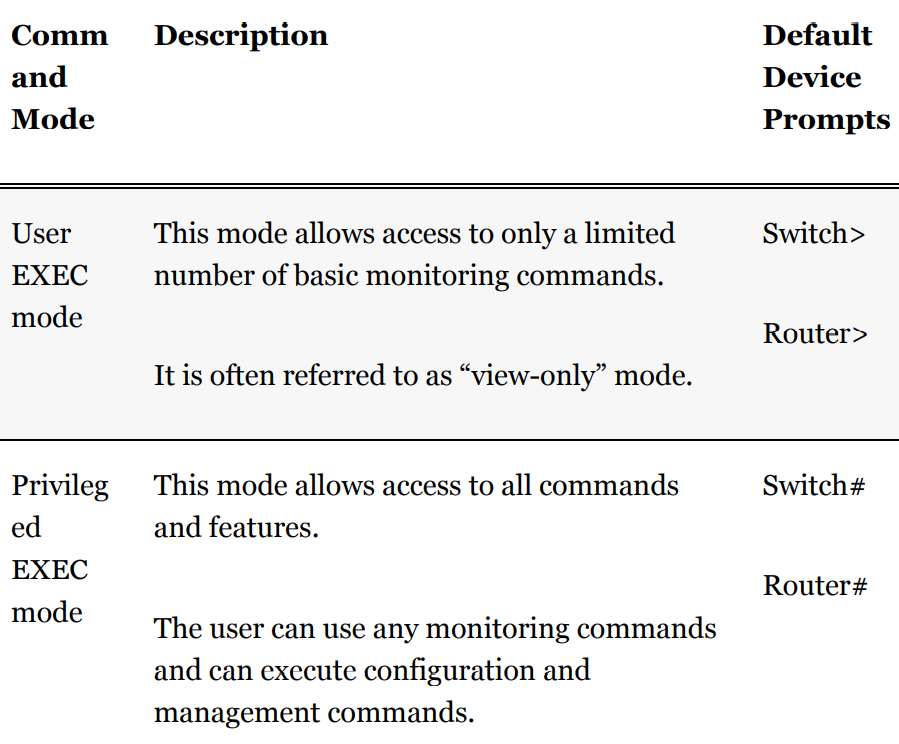
Cisco IOS software separates management access into the following two command modes: 
  • User EXEC mode: This mode has limited capabilities but is useful for basic operations. It allows only a limited number of basic monitoring commands and does not allow the execution of any commands that might change the configuration of the device. User EXEC mode is identified by the CLI prompt that ends with the > symbol. 
  • Privileged EXEC mode: To execute configuration commands, a network administrator must access privileged EXEC mode. Higher configuration modes, such as global configuration mode, can be reached only from privileged EXEC mode. Privileged EXEC mode can be identified by the prompt ending with the # symbol. 
IOS Command Modes

Global configuration mode A mode used to configure global parameters or enter other configuration submodes, such as interface, router, and line configuration submodes.


ping
A troubleshooting tool used to verify network connectivity by sending a packet to a specific IP address and waiting for the reply.


Traceroute (tracert) A command on many computer operating systems that discovers the IP addresses and possibly hostnames of the routers used by the network when sending a packet from one computer to another.

Virtual terminal (vty) A text-based logical interface on an IOS device. It is accessed using Telnet or SSH to perform administrative tasks. A vty line is also called a virtual type terminal.

Configuration Files 
Two system files store the device configuration:

  • Startup-config: This is the saved configuration file that is stored in nonvolatile random-access memory (NVRAM). It contains all the commands that will be used by the device upon startup or reboot. Flash does not lose its contents when the device is powered off. 
  • Running-config: This is stored in random-access memory (RAM). It reflects the current configuration. Modifying a running configuration affects the operation of a Cisco device immediately. RAM is volatile memory. It loses all of its content when the device is powered off or restarted.


IP Addresses


The use of IP addresses is the primary means of enabling devices to locate one another and establish end-to-end communication on the internet. Each end device on a network must be configured with an IP address.

Examples of end devices include:
  • Computers (workstations, laptops, file servers, web servers)
  • Network printers 
  • VoIP phones 
  • Security cameras 
  • Smartphones 
  • Mobile handheld devices (such as wireless barcode scanners).
IPv4 address A 32-bit number, written in dotted decimal notation, used by the IPv4 protocol to uniquely identify an interface connected to an IP network. It is also used as a destination address in an IP header to allow routing. As a source address, it enables a computer to receive a packet and to know to which IP address a response should be sent.


IPv6 address A 128-bit address written in hexadecimal used by the IPv6 protocol. IPv6 addresses are the successor of IPv4 addresses.

Switched virtual interface (SVI) A virtual interface for which there is no associated physical hardware on the device. An SVI is created in software. The virtual interfaces are used as a means to remotely manage a switch over a network. They are also used for routing between VLANs. 


CONFIGURE IP ADDRESSING
IPv4 address information can be entered into end devices manually or automatically using Dynamic Host Configuration Protocol (DHCP). To manually configure an IPv4 address on a Windows host, open the Control Panel > Network Sharing Center > Change adapter settings and choose the adapter. Next, right-click and select Properties to display the Ethernet Properties dialog,

Dynamic Host Configuration Protocol (DHCP) A protocol used to dynamically assign IP configurations to hosts. The services defined by the protocol are used to request and assign an IP address, a default gateway, and a DNS server address to a network host. 

Domain Name System (DNS) An internet-wide system by which a hierarchical set of DNS servers collectively hold all the name-to-IP address mappings, and DNS servers refer users to the correct DNS server to successfully resolve a DNS name.


Recent Posts